Business travel is a regular part of operations for many companies. Employees may drive to client meetings, project locations, supplier appointments, industry events, or other work-related destinations. While these journeys are often essential, recording every trip accurately can create an additional administrative burden.
Manual mileage records can take time to maintain, especially when employees need to track several journeys each week. Paper notes, spreadsheets, and memory-based records may also increase the possibility of missing or inaccurate information.
Using apps to track mileage for business can provide a more organised approach. Digital mileage tracking can help employees record journeys, maintain travel histories, calculate distances, and prepare information for expense reporting with less manual effort.
Why Manual Mileage Tracking Can Take So Much Time
Traditional mileage tracking often involves several separate steps. Employees may write down their journeys, calculate distances, organise receipts, and later transfer the information into an expense report.
As the number of business journeys increases, these small tasks can consume a considerable amount of time.
Common challenges include:
- Forgetting to record individual journeys
- Manually calculating travel distances
- Entering the same information more than once
- Searching through old notes for trip details
- Organising mileage records at the end of the month
- Separating business and personal journeys
Digital tracking can help reduce some of these repetitive tasks by keeping travel information organised in one place.
How Digital Mileage Tracking Works
Mileage tracking apps are designed to record and organise information about business journeys. Depending on the tool and its features, users may be able to enter trips manually or use automated tracking capabilities.
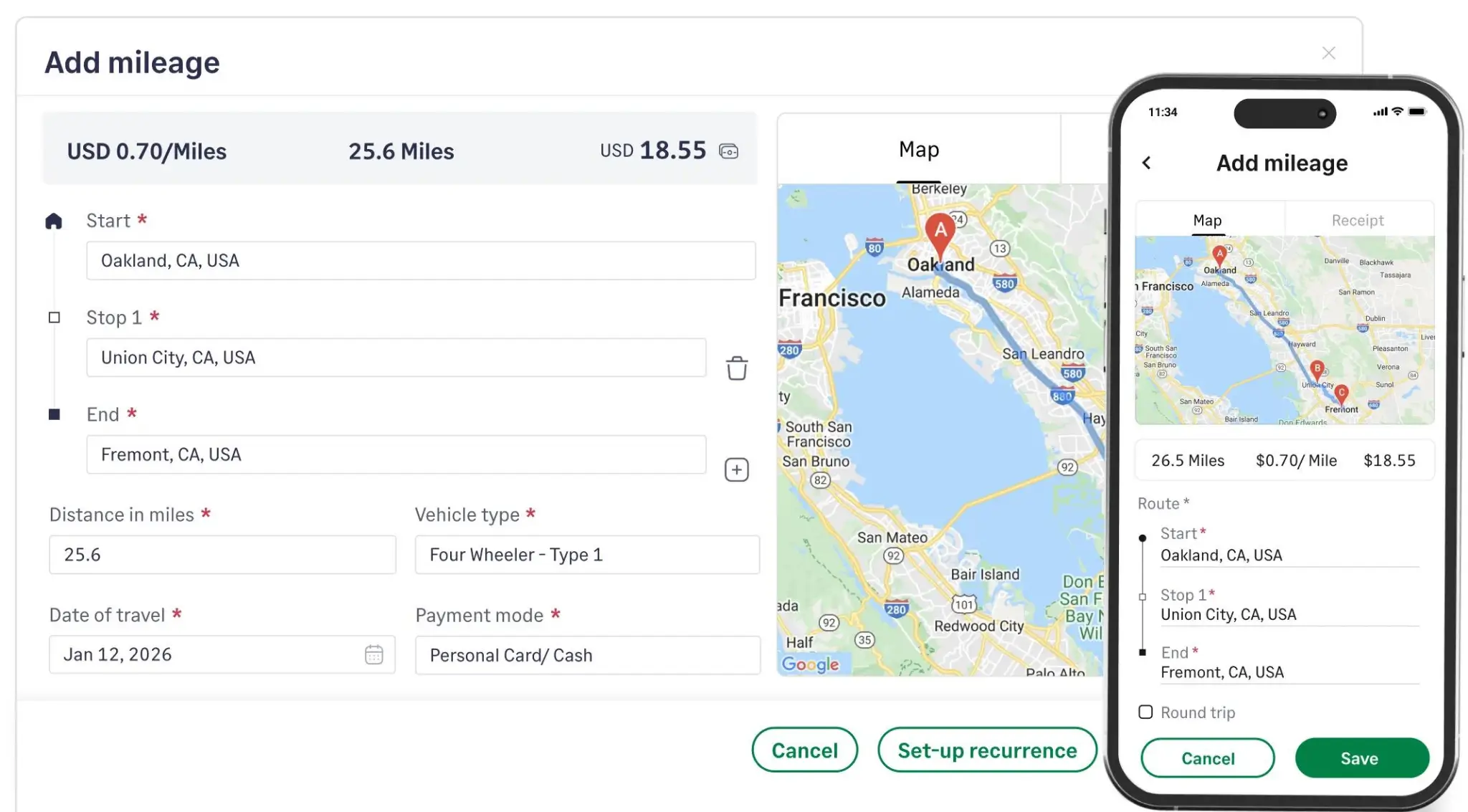
A typical mileage record may include:
- Date of travel
- Starting and ending locations
- Distance travelled
- Purpose of the journey
- Business or personal classification
- Related travel expenses
Once the information is recorded, it can be reviewed later for expense management, reporting, or general travel analysis.
Saving Time Through Automatic Distance Tracking
One of the biggest advantages of digital mileage tracking is reducing the need for manual distance calculations.
Instead of writing down every journey and calculating the distance afterwards, some tools can record travel information automatically based on available tracking features.
This can be particularly useful for employees who make multiple work-related trips during a single day.
Fewer Manual Entries
Reducing repetitive data entry can make mileage management less disruptive to the working day.
Less Time Spent Calculating
Automated or simplified calculations can reduce the need to manually work out the distance travelled for every journey.
Faster Record Updates
Employees can maintain their mileage records as they travel rather than setting aside significant time later to reconstruct their journeys.
Making Business Travel Records More Accurate
Saving time is important, but accuracy is equally valuable. A mileage record is only useful when the information it contains is reliable.
Digital tracking can help reduce some common problems associated with manual record keeping. For example, employees may forget a trip or accidentally enter the wrong distance when relying on memory.
A consistent digital process can help create more complete travel histories.
However, users should still review their records regularly. Automated tracking may occasionally require corrections, particularly when a journey includes unusual routes or stops.
Simplifying Expense Reporting
Mileage records are often connected to business expense reporting. Employees may need to submit information about work-related journeys so that travel costs can be reviewed or reimbursed according to company policies.
Digital mileage records can simplify this process by keeping trip information organised.
Organised Travel Information
Employees can review their journeys without searching through multiple notebooks, emails, or spreadsheets.
Easier Mileage Summaries
Mileage totals can be reviewed over selected periods, helping employees prepare information for regular expense submissions.
Reduced Administrative Work
Managers and administrative teams may spend less time checking incomplete or inconsistent mileage records when employees follow a standard digital process.
Keeping Business and Personal Trips Separate
Many employees use the same vehicle for work and personal activities. This can make manual mileage records difficult to maintain accurately.
A digital mileage tracking system can provide a way to classify journeys according to their purpose.
For example, a trip to a customer appointment can be identified as business travel, while a weekend personal journey can remain outside the business mileage record.
Maintaining this distinction can make expense reporting more straightforward and help businesses keep cleaner records.
Useful Features to Look For
Not every mileage tracking app offers the same capabilities. Businesses should consider their specific requirements before choosing a digital tracking approach.
Trip Categorisation
The ability to classify journeys can help employees separate business and personal travel.
Mileage History
A clear history allows users to review previous trips when preparing reports or checking records.
Expense Recording
Some tools allow users to record related travel expenses, helping create a broader picture of business travel costs.
Reporting Options
Reports and summaries can make it easier to review mileage information over a week, month, quarter, or other period.
Easy Data Entry
An intuitive interface can encourage employees to record trips consistently without spending excessive time on administration.
Helping Businesses Manage Multiple Employees
Mileage tracking becomes more challenging when several employees regularly travel for work.
Without a standard process, different employees may record their mileage in different ways. One person might use a spreadsheet, another might keep paper notes, and another might rely on memory.
A consistent digital system can provide a more standardised approach.
Businesses can establish guidelines covering:
- Which journeys should be recorded
- What information employees need to provide
- How business and personal trips should be categorised
- When records should be submitted
- What supporting documentation may be required
Clear procedures combined with digital tracking can make travel administration more manageable.
Reducing End-of-Month Administrative Pressure
One common problem with manual mileage tracking is leaving everything until the end of the month. By then, employees may have to remember dozens of journeys and reconstruct missing information.
Digital tracking encourages more regular record keeping.
When journeys are recorded throughout the month, employees do not have to spend hours trying to remember where they travelled or how far they drove.
This can create a smoother workflow and reduce last-minute administrative work.
Using Mileage Data for Better Business Planning
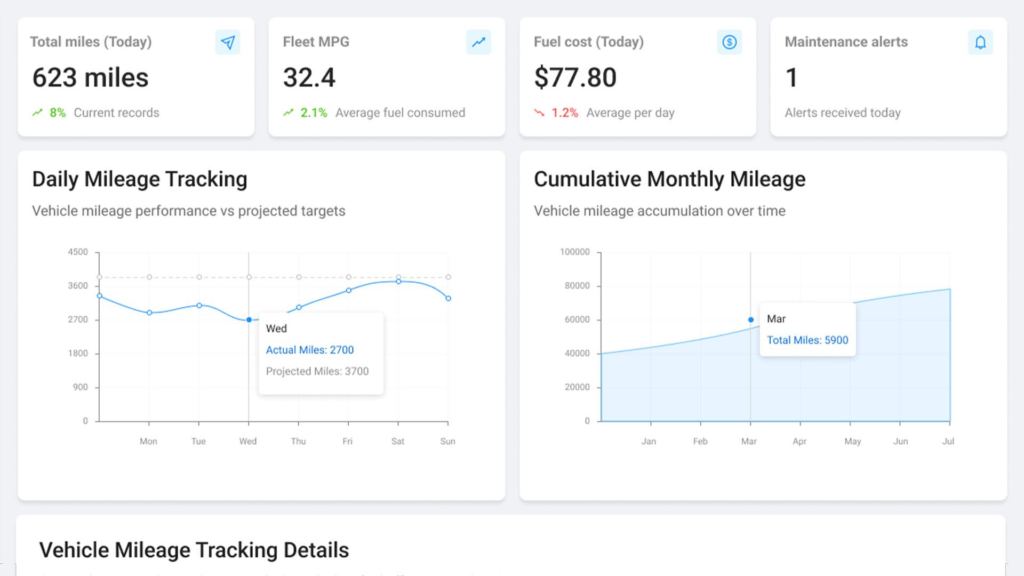
Digital mileage records can provide useful information beyond expense reporting.
When businesses have access to consistent travel data, they can identify patterns in employee travel and vehicle usage.
For example, records may show:
- Which periods involve the most business travel
- How frequently employees visit certain locations
- Which activities require significant driving
- Changes in travel levels over time
- Approximate transportation requirements
These insights can support travel budgeting and operational planning.
Tips for Getting the Most From Digital Mileage Tracking
A mileage tracking app is most effective when employees use it consistently. Businesses can improve results by establishing a few simple habits.
Record Trips Promptly
Travel information should be recorded as soon as practical to minimise forgotten details.
Review Entries Regularly
Employees should check their mileage records for missing trips or unusual information.
Keep Categories Consistent
Using the same definitions for business and personal journeys makes records easier to understand.
Follow Company Policies
Employees should follow their organisation’s requirements for mileage reporting, reimbursement, privacy, and record keeping.
Final Thoughts
Managing business mileage does not have to be a time-consuming administrative task. Manual records can become difficult to maintain as the number of employees and journeys increases, particularly when travel information needs to be reviewed regularly.
Using apps to track mileage for business can simplify distance recording, organise trip histories, reduce repetitive calculations, and support more efficient expense reporting. Digital tracking can also help employees maintain more consistent records while giving businesses greater visibility into work-related travel.
The most effective approach is to combine convenient digital tracking with clear internal procedures. When employees record journeys consistently and review their information regularly, businesses can spend less time managing mileage records and more time focusing on their core operations.